Bridge Assist
The Bridge Assist module automatically sneaks for you when you are near the edge of a block. This allows you to build bridges very quickly, without the risk of falling.
Edge offset
Section titled “Edge offset”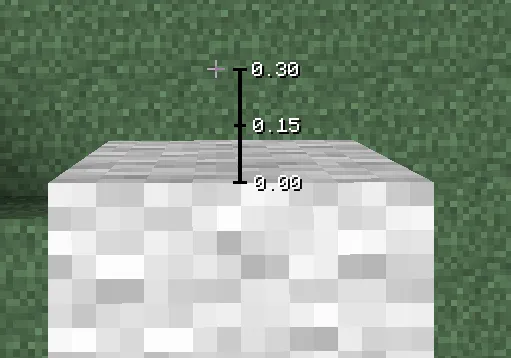
In Minecraft, you can walk a slight distance away from the edge of a block before you actually fall off. This setting specifies how far you are allowed to go before Bridge Assist will start sneaking.
Specifying a higher value, means the player will start sneaking later and therefore bridge faster.
Unsneak delay
Section titled “Unsneak delay”Specifies how long the player should keep sneaking, even after a block has been placed already.
Higher values means the player will sneak longer and therefore bridge slower.
Select blocks
Section titled “Select blocks”Configures whether Bridge Assist should select blocks from your hotbar:
Never select blocks automatically
On depletion
Section titled “On depletion”Don’t select blocks, unless you were already holding a stack and you just placed the last block.
Always
Section titled “Always”Always select blocks, regardless of what item you were holding previously.
Randomize
Section titled “Randomize”If enabled, the Edge offset and Unsneak delay settings will be randomized. This setting is typically only necessary on servers with good anti-cheats, to avoid getting detected for being too consistent.
Sneak on jump
Section titled “Sneak on jump”Sneaks when you jump to make it less likely that you fall off while bridging upwards.
Avoid double-sneaking
Section titled “Avoid double-sneaking”Delays block placements until you are positioned properly when bridging diaognally, which avoids the issue where you start sneaking twice per block.
Conditions
Section titled “Conditions”You can specify additional requirements that must be met to activate Bridge Assist:
- Sneak key pressed
- Holding blocks
- Looking down
- Not moving forward